Dynamics 365 CRM
Analytics By Squillion

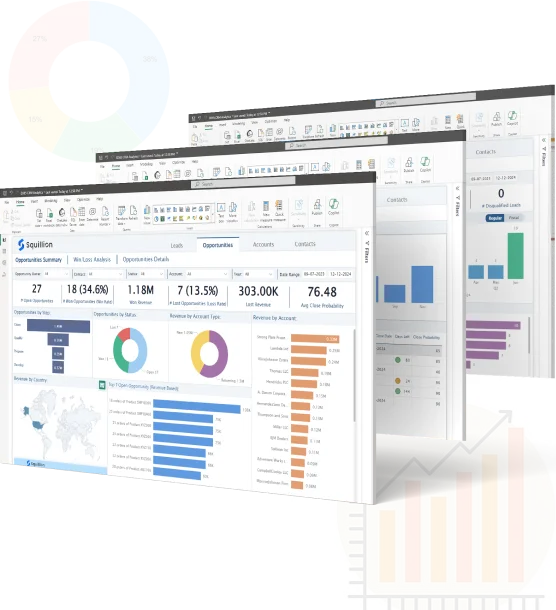
A powerful analytics app that seamlessly integrates with Dynamics 365 to deliver comprehensive business insights within the Power BI platform. Whether you’re a sales manager, business owner, or data analyst, our app provides you with the tools you need to visualize and understand your CRM data like never before!

CRM Analytics by Squillion

Installation instructions

To replace the demo data with your own data, follow these steps:

step 1
  • Login to Dynamics 365 Account
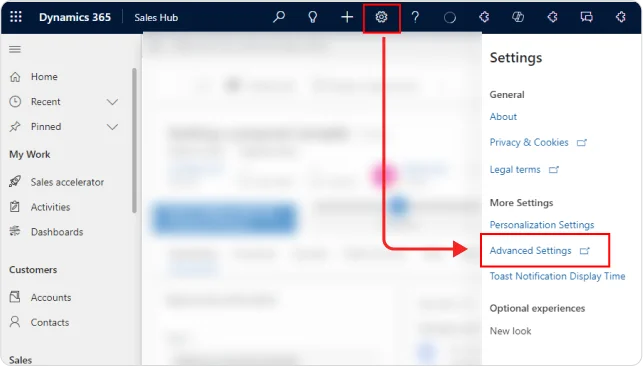
  • Go to Setting > Advanced Settings
  • Find Customizations in the sidebar.
  • Click on Developer resources.
Dynamics 365 Customizations
Power Apps Settings menu highlighting Developer resources
  • On the Power Apps page, check for the correct environment where Dynamics 365 CRM is setup Click settings button.
  • Then click on the Developers resources option.
  • Check for Web API endpoint.
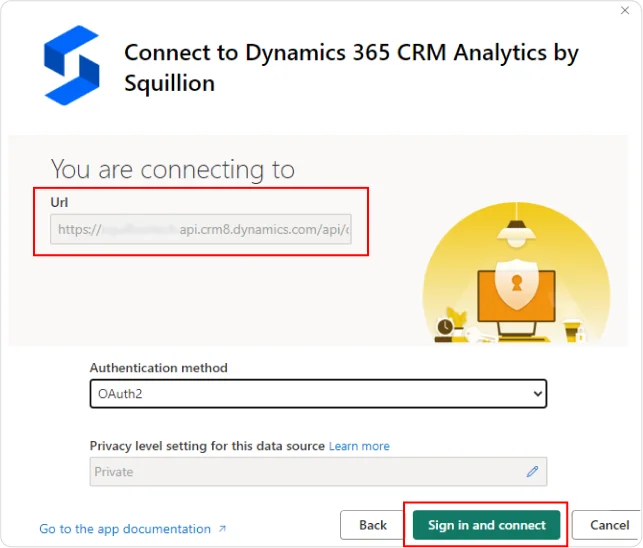
  • Copy yourorganization.api.crm8.dynamics.com
  • Paste the URL into theD365_Web_URLParameter Field.
  • Enter start date and snd date in YYYY-MM-DD format. End date is not required and will default to current date.
Power Apps Web API endpoint settings
step 5

Set the authentication method to OAuth2 and click "Sign in and Connect".

Whatsapp Contact Us